Showing posts with label Apple. Show all posts

Monday, November 8, 2010

MacBook Pro reflections

It’s been almost two months since I switch my work machine to a MacBook Pro. I’ve been asked a few times what I thought after having used it for a while. Honestly, I’ve got mixed feelings. First the pros:

  • Ergonomics – the hardware is very nice. The size and feel of the aluminum uni-body is great. There’s lots of little touches like the auto-dimming and the track pad. I’ve even found myself trying to use two- and three-finger gestures on a PC touch pad when I happen to use one.
  • The general thoughtfulness that goes into features like the widgets, Finder, and overall ease of use

However, there are still things that I don’t like or agree with:

  • Insistence on a single-button mouse. Even after using a Magic Mouse for a while I still find that my two button, scroll wheel PC mouse is much more useful – perhaps it comes from almost two decades of using a PC-style mouse.
  • Lack of consistency in keyboard shortcuts. Generally the basic keys like Command+A, Command+C work okay but apps tend to be different enough that it’s annoying. Sometimes its Control+ and other times its Command+.
  • Price.

I just priced out a full Dell XPS 17 with upgraded bells ‘n whistles and still came in at $2K while the MacBook Pro is $3K loaded. That’s a full 50% premium above a high-end PC! I’m also finding that it is…well, a machine – a computer. I can be productive and useful with either one but I just don’t get the rabid fan boy, bash a PC whenever possible, pry-it-out-of-my-cold-dead-fingers feeling. Now, I’m not a graphics designer – just a corporate business user so I have Office 201x on both the Mac and Windows 7 as well as the same browsers, chat programs, and pretty similar utilities.

Saturday, October 16, 2010

MacPorts - a slick system for easily installing OSS

It's been a month since I moved from a Windows-based laptop to a MacBook Pro and I'm just now getting around to playing with development toys..err, tools. First order of business was to grab Ant and Maven. Knowing that OS X is built around Linux meant it should be pretty easy. Of course, nothing ever is and it turns out there's lots of advice going back several years in the 'Verse. After seeing several references to MacPorts (formerly DarwinPorts) I checked it out. In a matter of minutes I had the two projects installed, configured and running.

Want to install Tomcat? It's as simple as...
$ port list tomcat*
tomcat-native  @1.1.20  java/tomcat-native
tomcat5        @5.5.25  java/tomcat5
tomcat6        @6.0.29  java/tomcat6


sudo port install tomcat6

Voila. There's 7,434 ports available at this time.

Powered by Qumana

Thursday, September 23, 2010

Cross-Platform Developer's Tools Comparison

One of the first things with moving to or even evaluating a new platform is figuring out what is "there" on the target OS. This answers the question "What can I still do" or better yet "How do I...".  Here's my comparison list of tools across Linux, OS X, and Windows. Yes, I know that OSX is Linux under the covers, however it is enough of a "standoff-ish" platform (IMHO) with regards to user experience, development platform/tools (used to build the software I'm talking about), etc. that I categorize it separately.

Tool Linux OSX Windows
Blog Writer Qumana Live Writer
Database Tool DbVisualizer DbVisualizer DbVisualizer
SQL Server Management Studio Express
Development IDE Eclipse
MonoDevelop
Eclipse
MonoDevelop
Eclipse
SharpDevelop
Visual Studio
File Compression 7-Zip 7zX 7-Zip
File/Folder Comparison Beyond Compare Delta Walker Beyond Compare
Instant Messaging Pidgin Adium Pidgin Pidgin
Source Control Subclipse Subclipse
Versions
AnkhSVN
TortoiseSVN
System Tray Status/Tools iStat Menus SysInternals
Text Editor Beyond Compare Text Wrangler Notepad++
Video Player VLC Player VLC Player VLC Player
XML Editor <oXygen> <oXygen> <oXygen>

Note that this list is what I've found for software that is comparable and gets the job done for me.
Tags: , , ,


Powered by Qumana

Wednesday, September 22, 2010

Thoughts on moving from Windows to Mac

This past weekend I migrated my laptop world from Windows to Mac OS X. As I'm bring apps and data over I'm discovering things that I didn't expect and having difficulty finding things...

  1. Keyboard navigation - the home, end, and paging (up/down) keys are missing. Paging is the most missed as I do more browsing, reading and searching than I do filling out forms. I suspect that only a subset of PC users actually use these keys - probably those of us who are more technically proficient. This leads to my first observation: applications that automatically select all text in a field (name, address bar, etc.) are appreciated. Firefox and Chrome do this but Safari and "native" Mac programs don't seem to which makes me think it's either a philosophical difference or perhaps there's a shortcut keystroke I haven't discovered.
  2. Menus and system tray along the top. I know that both OSes can be tweaked and customized but I tend to keep the customizations "down". I learned long ago that you can make your whole computing world "just so" only to go to another machine and be lost because it's not your machine. I like the tray in the upper right of the screen as it's more at eye level. I didn't realize this until the Mac when I realized I wasn't crouching over and squinting down in the corner to see the icons and the context menus. Of course, that's also a hazard of age and tired eyesight. I'm still finding that I'm looking for the application menu at the top of the window rather than the top of the screen.

Tags:

Powered by Qumana

Wednesday, April 15, 2009

Misguided usability “feature” in Safari

Safari_AppleStartPage Finding it necessary to test some features of a web application using Safari, I dutifully downloaded the Windows version and installed it. Upon launch I was greeted with this gaudy home page shown here on the right. Now maybe some people enjoy the tackiness of a supermarket tabloid emblazoned with color and too many things going on at once. In fairness, Apple’s start page is no worse than Microsoft’s MSN property. In all the years of using IE and Microsoft attempting to shove their noisy, bulked up on steroids homepage under foot as the welcome doormat, I’ve dutifully avoided it and set my startup page to Google’s minimalist starting point. To me it’s like the difference between opening my front door and stepping out onto a quiet, country scene or stepping out onto the sidewalk of the Las Vegas strip – to each his or her own.

Safari_setHomePageHowever, when I attempted to switch my home page over to Google I was jarred with this unexpected dialog from those brilliant minds at Apple. How do I put this gently? WTF?!?! What does setting my home page have to do with using the search bar? Don’t they get it? Let me put it to them plainly – I can’t stand your lousy home page and hope to never see it again.

After reflecting for a moment it occurred to me there’s some nefarious programming going on here. It wasn’t a case of them whining about not using their home page, THEY EXPLICITELY CHECKED FOR AND ATTEMPTED TO STOP ME FROM USING GOOGLE AS MY HOMEPAGE!!! They also deflected the issue by directing me to the search bar as though it was a matter of searching. Firefox doesn’t do this. Internet Explorer doesn’t do this. I’m guessing that Opera doesn’t either although I haven’t tried Opera.

It dawned on my that they made an intentional decision to write code that would check if I was switching my home page to Google’s and attempt to warn me off. Someone actually thought up this “feature”, added it to the development tasks, assigned it to a developer to code, wrote a test plan for QA to verify the “feature”, informed the localization team so that it could be translated into however many languages the browser supports and shipped it! How many man-hours of production costs went into this “feature”?

Um…maybe the Apple team (and the users of the software) would be better served by more useful features like a simple, easy way to debug JavaScript instead of this. Today being April 15th in the U.S. I thought it was apropos to mention this little additional “line item” in the Apple Tax.

Technorati Tags: ,,

Tuesday, April 14, 2009

Debugging Safari on Windows

Truthfully, I had strongly considered titling this post “Drive by blogging” as a nod to a drive by shooting or “Blog rage” in deference to road rage because that’s how I felt this morning. I briefly considered “Why Safari sucks” as well. The fact is that compared to debugging under Internet Explorer or Firefox, Safari is still in the dark ages.
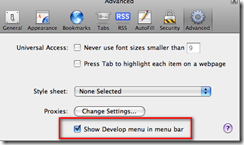
Safari_AdvancedPrefsSearching for “Safari debug JavaScript” easily turns up secret incantations for enabling the hidden Developer’s menu and you think you’re onto something only to be let down. Okay, that’s not totally fair – apparently you had to hunt for preferences and edit an XML file or type in an undocumented command string but now it’s found on the Edit | Preferences dialog under the Advanced “section” (or is that “tab” or “button” in Apple-speak – hard to tell with that non-intuitive dialog).
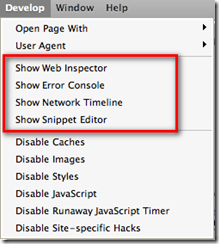
Safari_DeveloperMenu With the “Show Develop menu in menu bar” checked, you’ll be briefly pleased at the shiny new menu shown here on the left. I’ve highlighted the most promising options. Web Inspector is a nice little DOM inspector and even shows the JavaScript files currently loaded – same as Firefox/Firebug and IE/DeveloperTools. The Error Console is pretty standard and the Network Timeline is a very nice feature.

My issue with all this glitz is that IT’S FREAKIN’ NEAR USELESS!!! You can’t *DEBUG* JavaScript in a way that is considered modern, standard practice today. Unlike Internet Explorer with it’s developer add-in or Firefox’ Firebug add-in, you can’t set breakpoints and step through code, nor can you inspect variable values nor see a call stack to figure out where you’ve come from.

In fact, the above mentioned search yields as its number one result the Safari Developer FAQ which specifically answers the question - it’s #14 on the FAQ list. I’ll quote a bit of it here: “Safari 1.3 and above supports explicit logging of arbitrary information … by using window.console.log() in your JavaScript. All messages are routed to the JavaScript Console window and show up nicely in a dark green, to easily differentiate themselves from JavaScript exceptions.”

Gee, it bring tears to my eyes to think that 25 years ago when I first started programming in RPG II and Cobol-74 on IBM systems I could carefully insert debug logging code into my program and observe the values of variables when I re-ran the program and managed to bring it to the same state it was in that caused me to consider there’s a bug in there somewhere. It’s really great to know that the Apple team hasn’t strayed too far from the tried and true basics that have worked for so long. No wonder Safari is such a distant third in the browser market with the rest of the niche players – developers HATE working with it!!

On to my real gripe – if you really dig hard, you’ll come across the WebKit underneath Safari with instructions on how to build and debug it. There’s two itsy, bitsy things they don’t tell you in the Windows instructions…

  1. If you already have Cygwin for other things, forget about it. Rip it out and install their customized version mentioned in step 3. They’re not explicit about that and you will waste time otherwise. While I applaud them for making it somewhat turnkey, at least point out that they’ve got a custom configured version and that it’s the only way you’ll get it to work. Their wiki has a link to the “list” of packages (really just a pointer to the Perl source for the installer) but adding those packages to an existing Cygwin install still doesn’t work.
  2. The second dirty little secret they forgot to spell out…you *MUST* download the source under your home directory, e.g. /cygwin/home/<username>/WebKit. So /WebKit or /Src/WebKit, or /Repo/WebKit …none of these are allowed – there’s only one path structure that will work and it’s theirs. There’s plenty of path references inside their Perl scripts that assume this directory structure and will only work properly with it. I don’t necessarily have a problem with that, but I do have a problem with them not taking the extra minute to point this out clearly so as not to waste the time of others.

If you make either of these mistakes (or both, as I did) you will waste a lot of time and effort chasing missing things, strange error messages, and generally getting frustrated. Welcome to the wonderful world of free, open source projects – you get what you pay for…nothing!

Now on to debugging a JavaScript library that works beautifully under Internet Explorer and Firefox but not so much under he-who-must-not-be-named-browser.


P.S. Did you catch the hidden message? If you want to debug JavaScript running in Safari you need to download the source code for the browser, configure a proper build environment, then run the browser in the debugger. Ooh-rah! Only way to be productive.