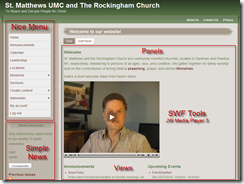
We are close to launching our re-designed website for the church I attend. To gain a bunch of functionality and enable easier updating we picked the Drupal CMS as a framework. The past three months have been a journey of discovery into its features that is reflected in our home page shown on the right.
The default Navigation menu has been enhanced by including the
Nice Menus module. This gives us cascading sub-menus for “free” by simply installing and configuring the module. You simply need to edit the left-sidebar block and
replace the Navigation block with the Nice Menu module then choose “Configure” next to the Nice Menu and select the <Navigation> menu as its Source Menu Tree.
We used the
Simple News module to handle weekly emails and exposed it as a block shown on the lower left. Simple News enables user-controlled subscriptions and handles batched sending from the web server. Previously our administrative assistant used Outlook and had to divvy up the distribution list into several chunks to stay beneath her email host’s restrictions for bulk emails. Now it happens “magically” using cron features on the server – a fire-and-forget approach.
The main content area started out as a simple Page node-type however we wanted more granular control of the content layout so we added
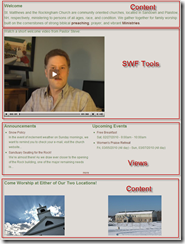
Panels. Originally we had a welcome message followed by the photos/writeups of our two locations and the two
Views blocks for announcements and upcoming events at the bottom of the content area. As the page evolved, we decided that the announcements and upcoming events should be more prominently displayed between the two content areas. We also wanted to insert a flash video welcome message from our pastor between the two sections as well. One approach would have been to resort to coding a custom theme template peppered with PHP code however that would’ve limited its use and updating to…well, just me! By using Panels I was able to layout the page into four main sections and make it accessible to others right from the website without resorting to hand-editing files on the web server as shown below:

Notice that the two middle sections use Views as their content source. So far, the only coding I’ve had to do is a custom installation script for deployment to the live server and a custom theme for the sermons page. Drupal is impressive for the amount of features and maturity of the package that enables complex sites to be built with very little coding – all for the price of $0 and a little time and effort!


