Friday, August 7, 2009

WEI on Vista x64 vs. Win7 x64

Technorati Tags: ,

I just finished installing Win7 RTM x64 on my Lenovo T61p and here’s the results of the Windows Experience Index (WEI):

T61p_WEI_Win7 

Here’s the results “as delivered” last summer from Lenovo with Vista x64:

T61p_WEI_Vista

It’s basically the same machine – I say “basically” because technically there’s a different hard drive – both are SATA 7200 rpm. There are really two variables in play here – the different OS of course and different drivers.

As delivered it had all the Lenovo eye candy installed which I left pretty much left intact except for occasional system updates. With the fresh installation of Win7 RTM x64 I managed to get a working nVidia driver by using the latest Vista 64-bit version (ver. 7.15.11.7693, 2009/01/15) from their support site working. I was not able to the the official nVidia Windows 7 64-bit version (ver. 186.03, 2009/06/09) to install however they’ve labeled it a beta release.

Wednesday, April 15, 2009

Misguided usability “feature” in Safari

Safari_AppleStartPage Finding it necessary to test some features of a web application using Safari, I dutifully downloaded the Windows version and installed it. Upon launch I was greeted with this gaudy home page shown here on the right. Now maybe some people enjoy the tackiness of a supermarket tabloid emblazoned with color and too many things going on at once. In fairness, Apple’s start page is no worse than Microsoft’s MSN property. In all the years of using IE and Microsoft attempting to shove their noisy, bulked up on steroids homepage under foot as the welcome doormat, I’ve dutifully avoided it and set my startup page to Google’s minimalist starting point. To me it’s like the difference between opening my front door and stepping out onto a quiet, country scene or stepping out onto the sidewalk of the Las Vegas strip – to each his or her own.

Safari_setHomePageHowever, when I attempted to switch my home page over to Google I was jarred with this unexpected dialog from those brilliant minds at Apple. How do I put this gently? WTF?!?! What does setting my home page have to do with using the search bar? Don’t they get it? Let me put it to them plainly – I can’t stand your lousy home page and hope to never see it again.

After reflecting for a moment it occurred to me there’s some nefarious programming going on here. It wasn’t a case of them whining about not using their home page, THEY EXPLICITELY CHECKED FOR AND ATTEMPTED TO STOP ME FROM USING GOOGLE AS MY HOMEPAGE!!! They also deflected the issue by directing me to the search bar as though it was a matter of searching. Firefox doesn’t do this. Internet Explorer doesn’t do this. I’m guessing that Opera doesn’t either although I haven’t tried Opera.

It dawned on my that they made an intentional decision to write code that would check if I was switching my home page to Google’s and attempt to warn me off. Someone actually thought up this “feature”, added it to the development tasks, assigned it to a developer to code, wrote a test plan for QA to verify the “feature”, informed the localization team so that it could be translated into however many languages the browser supports and shipped it! How many man-hours of production costs went into this “feature”?

Um…maybe the Apple team (and the users of the software) would be better served by more useful features like a simple, easy way to debug JavaScript instead of this. Today being April 15th in the U.S. I thought it was apropos to mention this little additional “line item” in the Apple Tax.

Technorati Tags: ,,

Tuesday, April 14, 2009

Debugging Safari on Windows

Truthfully, I had strongly considered titling this post “Drive by blogging” as a nod to a drive by shooting or “Blog rage” in deference to road rage because that’s how I felt this morning. I briefly considered “Why Safari sucks” as well. The fact is that compared to debugging under Internet Explorer or Firefox, Safari is still in the dark ages.
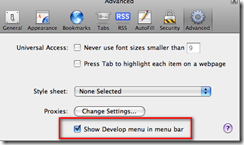
Safari_AdvancedPrefsSearching for “Safari debug JavaScript” easily turns up secret incantations for enabling the hidden Developer’s menu and you think you’re onto something only to be let down. Okay, that’s not totally fair – apparently you had to hunt for preferences and edit an XML file or type in an undocumented command string but now it’s found on the Edit | Preferences dialog under the Advanced “section” (or is that “tab” or “button” in Apple-speak – hard to tell with that non-intuitive dialog).
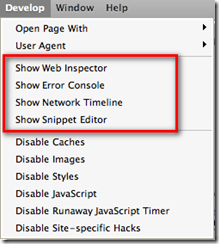
Safari_DeveloperMenu With the “Show Develop menu in menu bar” checked, you’ll be briefly pleased at the shiny new menu shown here on the left. I’ve highlighted the most promising options. Web Inspector is a nice little DOM inspector and even shows the JavaScript files currently loaded – same as Firefox/Firebug and IE/DeveloperTools. The Error Console is pretty standard and the Network Timeline is a very nice feature.

My issue with all this glitz is that IT’S FREAKIN’ NEAR USELESS!!! You can’t *DEBUG* JavaScript in a way that is considered modern, standard practice today. Unlike Internet Explorer with it’s developer add-in or Firefox’ Firebug add-in, you can’t set breakpoints and step through code, nor can you inspect variable values nor see a call stack to figure out where you’ve come from.

In fact, the above mentioned search yields as its number one result the Safari Developer FAQ which specifically answers the question - it’s #14 on the FAQ list. I’ll quote a bit of it here: “Safari 1.3 and above supports explicit logging of arbitrary information … by using window.console.log() in your JavaScript. All messages are routed to the JavaScript Console window and show up nicely in a dark green, to easily differentiate themselves from JavaScript exceptions.”

Gee, it bring tears to my eyes to think that 25 years ago when I first started programming in RPG II and Cobol-74 on IBM systems I could carefully insert debug logging code into my program and observe the values of variables when I re-ran the program and managed to bring it to the same state it was in that caused me to consider there’s a bug in there somewhere. It’s really great to know that the Apple team hasn’t strayed too far from the tried and true basics that have worked for so long. No wonder Safari is such a distant third in the browser market with the rest of the niche players – developers HATE working with it!!

On to my real gripe – if you really dig hard, you’ll come across the WebKit underneath Safari with instructions on how to build and debug it. There’s two itsy, bitsy things they don’t tell you in the Windows instructions…

  1. If you already have Cygwin for other things, forget about it. Rip it out and install their customized version mentioned in step 3. They’re not explicit about that and you will waste time otherwise. While I applaud them for making it somewhat turnkey, at least point out that they’ve got a custom configured version and that it’s the only way you’ll get it to work. Their wiki has a link to the “list” of packages (really just a pointer to the Perl source for the installer) but adding those packages to an existing Cygwin install still doesn’t work.
  2. The second dirty little secret they forgot to spell out…you *MUST* download the source under your home directory, e.g. /cygwin/home/<username>/WebKit. So /WebKit or /Src/WebKit, or /Repo/WebKit …none of these are allowed – there’s only one path structure that will work and it’s theirs. There’s plenty of path references inside their Perl scripts that assume this directory structure and will only work properly with it. I don’t necessarily have a problem with that, but I do have a problem with them not taking the extra minute to point this out clearly so as not to waste the time of others.

If you make either of these mistakes (or both, as I did) you will waste a lot of time and effort chasing missing things, strange error messages, and generally getting frustrated. Welcome to the wonderful world of free, open source projects – you get what you pay for…nothing!

Now on to debugging a JavaScript library that works beautifully under Internet Explorer and Firefox but not so much under he-who-must-not-be-named-browser.


P.S. Did you catch the hidden message? If you want to debug JavaScript running in Safari you need to download the source code for the browser, configure a proper build environment, then run the browser in the debugger. Ooh-rah! Only way to be productive.

Sunday, March 8, 2009

.NET Adventure - Business Layer (part 2)

This post is part of a series on building a complex .NET application from scratch. In part 1 I introduced business entities and refactored code out of the data layer. Now I'm going to build out the business logic and add unit tests to support it.

NAdv14.BusinessObject.CustomerBO.ClassDiagram A new BusinessObject project (assembly) has been created and a CustomerBO class added to the project. This class contains the business logic for the customer domain entity. The class diagram for this CustomerBO is shown on the right. As the diagram indicates there are methods to get a customer instance as well as store one. In the case of GetCustomer() an instance of the Customer business entity previously described is returned with fully populated attributes. StoreCustomer() takes a Customer entity instance previously populated by a client layer and passes it to the appropriate data access object for storage.

NAdv14.BusinessObject.CustomerBO Looking at the code shown on the left, the red arrow coming in from the left side indicates where an external caller would call in to the CustomerBO class to retrieve a customer instance. The additional parameter includeAddress allows the caller to control how "deep" the retrieval goes. If only basic customer attributes are needed then setting includeAddress to false will return just the "primary" attributes. However, setting includeAddress to true will cause the customer business object to populate associated addresses by passing the customer instance to LoadAddresses. The LoadAddresses method invokes the GetAddresses method which returns the list of associated addresses and then LoadAddresses sets the customer entity's Addresses property to the result.

Since a customer address doesn't have business meaning outside of a customer I've decided not to expose a Customer Address business object. Instead, the few needed methods for manipulating the addresses have been added to the Customer business object. As the code shows, the object is "smart enough" to retrieve, set, and store associated addresses.

Notice that the Customer business entity (a.k.a.the data transfer object) is passed by the CustomerBO business object to the CustomerDAO data access object. The data access object "knows" how and where to persist the attributes of a customer, including the associated addresses. Another approach might be to have the business object, CustomerBO in this case, decompose the business entity and make decisions regarding what to store. Doing so introduces other side effects such as the business layer needing to manage transactional semantics when called upon to store information. That is, if the business object decomposes a Customer entity into its component parts - a Customer and a CustomerAddress - it will have to invoke the data access layer twice, once to store the customer and a second call to the CustomerAddressDAO to store its data. In the event of a failure, the database could be left in an indeterminate state. The usual way to handle this possibility is to wrap both calls inside a transaction. This causes the business objects to have references to and use a transaction manager. The real question is does transactional storage semantics belong up in the business layer or down in the data layer.

Now that the original data layer has been refactored we can return to the unit tests. Firstly, the DataLayer tests have been updated slightly to create instances of a Customer business entity and pass to the CustomerDAO methods. A second set of tests have been added to test the business layer. Once again, by taking the time early on to put the testing framework into place, it is reaping rewards every time we make a change to the code. We're able to exercise each layer as we go and ensure that all the moving parts line up correctly.

The code for this version of the project can be downloaded here. You'll find the new Business Object project as well as updated unit tests.

Monday, February 9, 2009

.NET Adventure - Business Layer (part 1)

This post is part of a series on building a complex.NET application from scratch. In Parts 1, 2, and 3, I introduced the data layer along with tools like NUnit, NAnt, and FxCop to round out the project development. Today I'm going to cover the first part of the entity layer.

RefAppArch Having made a first pass at the data layer in previous posts, I'm going to move up to the business layer and begin working there. Recall the Common Application Architecture diagram from Chapter 3 of Microsoft's Application Architecture Guide 2.0 shown here. Whereas the data layer used the Active Record pattern to model or "wrap" each table as a class with CRUD methods for persisting to/from the underlying table, the business layer decomposes the work into up to four separate components tailored to specific purposes.

Generally speaking, the business layer is where the domain rubber meets the binary road - that is, you typically implement the domain model and logic there. It's called the "business" layer for good reason - it's the business view of the application. While you may have normalized the data storage to 3NF such that E.F. Codd would be proud were he still here, the business view of data is typically courser grained and models business or "real world" entities. For example, in AWLT we have a Customer table and a Customer Address table which translates into two separate classes in our data layer according to the rules of the Active Record pattern. However, a business view would consider them a single Customer entity having properties of name, email address, etc. *and* one or more addresses.

NAdv.DataLayer_customer In the previous version the Data Layer defined a classic business object containing data and logic as shown on the right. Notice that there are a number of instance methods (without underlines) such as Load and Store that operate on the instance data contained within the object. However, we're going to refactor the properties out to a separate entity and make the data access object contain logic only.

The Business Entities component is where you define these entities and the Business Components is where you implement the business logic. This separation of logic and data is different from a classic business object where the data and object are encapsulated in a single class. In a layered architecture the data will need to be accessed in several places so it is usually split out into its own Business Entity component thus the Data Transfer Object pattern serves the purpose of defining entities that can be shared between parts of the system.

NAdv.BusinessEntity.Customer Notice on the left diagram there are now two classes in separate packages. First there's a new Customer class in the BusinessEntity package containing only properties (just a few are shown here). DTOs are pretty light weight - a public class with public properties that's marked as serializable. Second the data layer class formerly known as "Customer" has been refactored to CustomerDao since it is now a true data access object. The properties have been moved out and the methods are now all static since they no longer have instance data with which to work. Finally, note that several methods such as Load and Store accept a Customer instance as a parameter. Previously we would create an instance of the data layer class, set its properties and then invoke its methods to persist. Now we create an instance of the Customer entity, fill its properties and pass that instance to the Dao class to persist it.

The business entity classes can be implemented in different ways. First, they can simply be a sub folder within in a single business layer project perhaps with a separate namespace (e.g. NAdv.BusinessLayer.BusinessEntity) that is compiled into a single Business Layer assembly. The problem with this approach is that any other part of the application that needs to use a business entity (such as shown with the data layer above) must reference and have access to at runtime the business layer assembly. The further implication is that the presentation layer which "consumes" these business entities could reside on a Windows client machine and would need a copy of the business layer installed locally in order to "receive" the data from the service layer. Another way to implement business entities is to place them into their own assembly, which I've done.

The code for this version of the project can be downloaded here. You'll find the new BusinessEntity project, the refactored DataLayer project and the updated unit tests.

Friday, February 6, 2009

XBOX 360, Windows Media Center and Streaming Movies

Last weekend I decided to try setting up my Xbox 360 to play media stored on a separate server. While doing so I discovered a few tidbits that weren't obvious or clearly spelled out. I've got a "spare" laptop running Windows Vista Ultimate in my office. While I could move it down to the family room next to the T.V. it won't pass the WAF. No problem, I've got the house wired for networking so I'll just leave the PC where it is and run it from there through the Xbox using the Media Center Extender I've read about.

The first step I took was to go into the Media Center UI and add a "watched folder" (Tasks / Settings / Library Setup / Add Folder to Watch) for the shared folder I had already setup on the server. At this point, I can browse the library, select a movie and play it right there on the PC - so far so good.

To configure the Xbox to see the Media Center PC you have to "validate" the network settings on the Xbox. In my case, it couldn't "see" the Media Center PC. The troubleshooting section mentioned the game console and MPC have to be on "the same network". I suspect they mean the same network segment - it must be sending out a UDP broadcast. In my case the home wired network is 192.168.1.x but in the family room I also have a wireless access point with 4 Ethernet ports on the back which I've connected the Xbox to. The wireless router happens to be doling out 192.168.3.x addresses and sure enough, that's the IP the console has been assigned. Moving the Xbox off the wireless router and over to a wall plug on the "main" network segment (192.168.1.x) magically cured the problem.

Now I can go into the MCE menu on the Xbox and I'm seeing the blue UI for MCE - seems to be remotely controlling the MCE UI - cool! However, going into the video library, I can't see any movies. I next try "adding" the shared folder again but it can't even see the other server. Hmm...After hunting around I find a Microsoft KB article (932306) and learn that MCE has created a local user account named MCX1 when I added the extender. Ah ha! This local machine account on the MPC doesn't have permission to see/browse the shared folder on the server. Rather than mucking around with domain accounts I set up a local account on the server and grant permissions. Back on the MPC I create a batch script to map a shared drive letter using the account credentials I just set up on the server. I then changed the MCX1 account to assign this as the logon script and reboot to be safe. Now when the Xbox talks to the MCE service, the MCX1 account that's used can get to the server share.

At this point it looks like things are working. I can go into the Media Center menu on the Xbox and see the video library with the list of movies. Try to play one and...oops, unable to play. Digging around on the Internet I find out that the Xbox can't decode the Divx format - it only likes good ol' WMV encoded movies. Sigh. I chose Divx thinking it was a higher quality, better compression format that was more likely to be supported by a wide variety of devices. I then run across a couple of posts in forums indicating that this is a known problem but that you can stream from Windows Media Player just as well and that it transcodes and supports more formats. Instead of going into the fancy Windows Media Center menu on the Xbox and remotely controlling the MCE on the Media Center PC, you can choose the plain-looking green "Video Library" menu option and access the shared media library via the Windows Media Player route. Voila, movies now stream to the T.V. through the Xbox. No more getting up and swapping DVDs or worrying about scratches!

So why did the Media Center PC play the movies on the PC but Xbox wouldn't? Because I had installed the Divx player and codecs on the PC, it "knew" how to decode the format and play. Seems the Xbox can "control" the MCE remotely but the movie is sent down to the Xbox where it attempts to decode and play on the console. However, the Windows Media Player sharing automatically transcodes the movies on the fly while sending them to the Xbox.

Friday, January 23, 2009

Putting your eggs in one SATA basket

Dylan Beattie lamented over on his blog about RAID and it's problems. I, too, had experienced problems in the past and discovered some of the same issues. I have two possibilities that seem the least offensive - use *Windows* RAID which theoretically is not as fast as hardware-based but is portable to another running Windows machine. No longer are you tied to a particular board manufacturer's unique RAID solution.

In my case, I started with RAID 5 using the on-board controller from an NVidia N-Force motherboard only to have it keep crapping out. Finally, I went out and bought an Adaptec controller, backed up what I had, reformatted the drives for the new controller and then loaded on the data. After two more partial failures in two months I was at my wits end regarding RAID when I found a mention of using Windows-based RAID and freeing yourself from hardware tie-in. I knew that if something had happened to the Adaptec controller, I'd need to get another one in order to get access to the data "locked" in it's proprietary RAID scheme. With Windows, I was even able to move the drives from a Windows 2003 server over to a Windows 2008 server without losing data. Why? It's still NTFS and it's still their RAID system so any Windows server will do. The only downside I've found it that Microsoft only "exposes" RAID on their server products so if you're a real hard-core developer who installs server instead of workstation (oops, professional, no business!) then this is a workable solution for you.

What's more liberating than the RAID route is using virtual machines to develop with. I first began using them in 2003 when Microsoft acquired Connectix and began offering v5.5 for download on MSDN. Now, my "normal" machine configuration is a laptop with "desktoppy" applications - Office, Paint.NET, readers, tools, etc. along with virtual machines that have only the minimum required development tools. The development VM is not longer tied to a physical machine and backing it up is simply a matter of copying/compressing the *.vhd disk image file. If you leave a large-capacity USB drive attached to your workstation, you can make backups at will or at scheduled intervals. Wanna try the new VS2008? Maybe the VS2010 CTP? No problem! Just spin up a new VM and install there - no harm and nothing else is affected. If you go this route, I suggest you install a base image of Windows (XP SP3, Vista SP1, Server, whatever) and then shut down and back it up! Now, if you wish to try a new tool/environment then you restore/rename the backup and simply start installing the tools you wish. Note that I always use NewSID to both generate a random system ID and rename the machine.